← ProjectsRobotics / Perception
S.C.O.P.E.
Spot Control, Observation, and Preview Environment
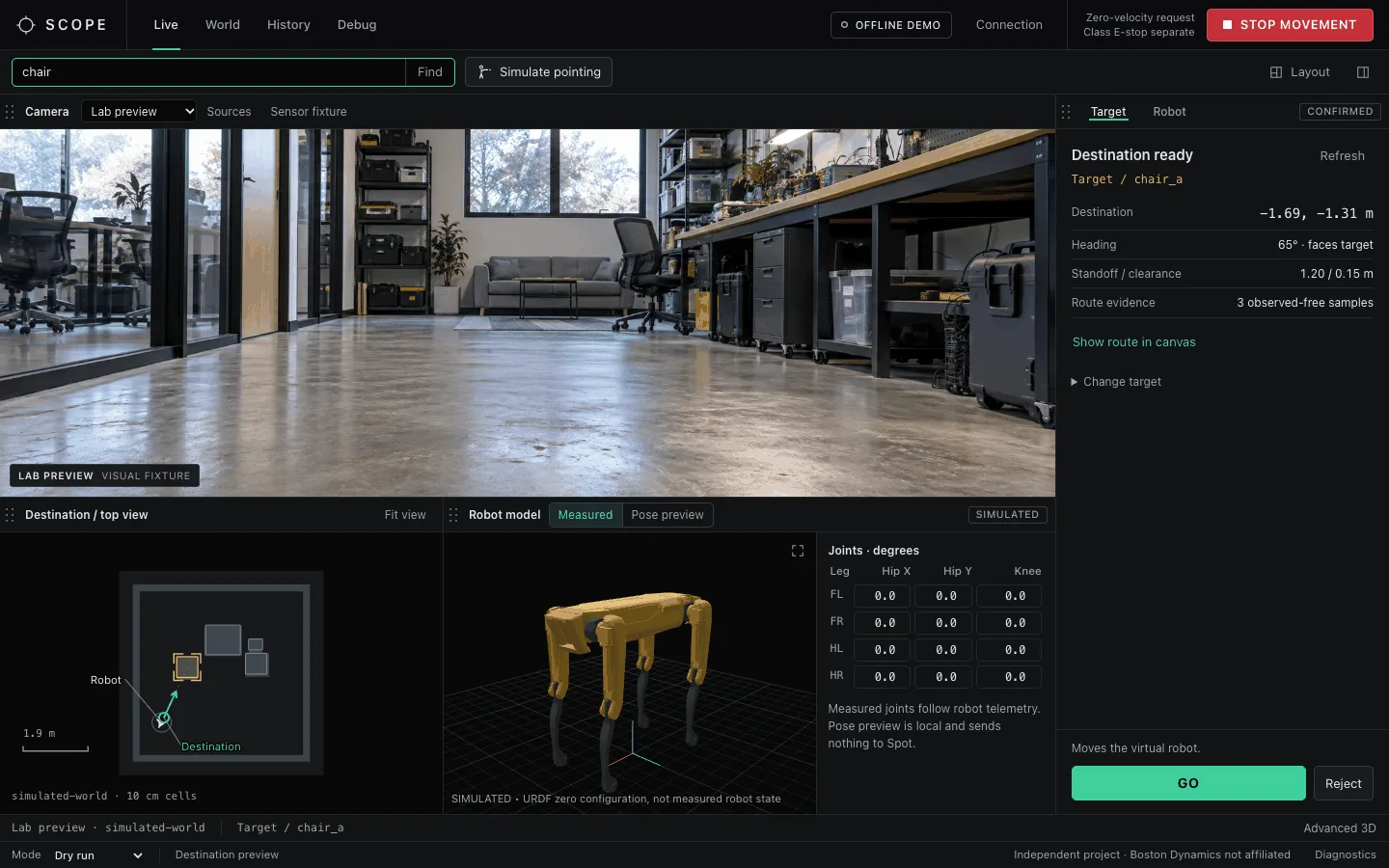
A browser console for Boston Dynamics Spot. It streams the robot’s cameras, handles manual driving and posture, and lets you choose a target by typing a word, pointing at it, or clicking the map. SCOPE then finds the object with open-vocabulary detection, places it in a 3D occupancy map built from depth, and proposes a collision-checked destination. The robot doesn’t move until a person confirms the plan, and every confirmation expires.
- Stack
- Python 3.11+, Spot SDK, browser UI, Rerun
- Perception
- Grounding DINO, OWLv2, SAM 2.1, Mask R-CNN
- Mapping
- RGB-D voxel occupancy at 10 cm, TSDF surface
- Tests
- 118 unit tests, synthetic room fixture
One path from intent to motion
Typing, pointing, and clicking an object on the map all produce the same TargetCandidate and go through the same steps. That way the safety checks only have to be right in one place.
- SelectText query, a pointing ray, or a map entity.
- GroundDetection plus depth gives the target’s world bounds and evidence.
- ConfirmA person accepts the candidate or cycles to the next one.
- PreviewThe planner proposes a standoff pose and a route.
- GOEverything is rechecked, and the approval can only be used once.
If pointing doesn’t clearly resolve to one object, SCOPE doesn’t pick one. A 2D-only detection can be highlighted, but it can’t produce a destination, because a box in an image has no position in the room.
Perception and mapping
Depth frames with known poses are integrated into a voxel map at 10 cm, where each cell is occupied, free, or unknown. Depth is used between 0.15 and 5 m. A hole in the depth image leaves its cells unknown rather than marking them free, because missing data shouldn’t count as open floor. A TSDF fusion pass builds the surface mesh.
Instance masks are projected into world space with depth. Repeated views are fused into entities, each with a stable ID, a class distribution, 3D bounds, uncertainty, and the frames that support it. A SQLite memory layer links entities across visits, so the system can say where an object was last seen after it moves out of view.
Frame validation rejects delayed depth, intrinsics that change mid-stream, invalid transforms, and timestamps that don’t increase. Spot’s fisheye pairs are rectified to a pinhole view before they’re used.
Destination planning
The planner proposes a pose outside the target’s bounds, facing it. It then sweeps the robot’s full footprint, plus 0.15 m of clearance, along a straight route. If any sample touches an occupied or unknown cell, the route is rejected. It’s a conservative proposal, deliberately stricter than Spot’s own obstacle avoidance.
Safety model
Most of the engineering went into making sure stale or uncertain data can’t become motion:
- A destination preview can be used once and expires after 10 s. Evidence older than 1.5 s can’t be confirmed.
- GO rechecks target freshness, stable geometry, fresh standing robot state, map clearance, and that the destination still matches. If the target moves, disappears, or loses depth, nothing is sent.
- Teleop velocity commands expire after 0.35 s unless renewed. Releasing a key, Stop, focus loss, a hidden tab, a dropped connection, or shutdown all send zero velocity.
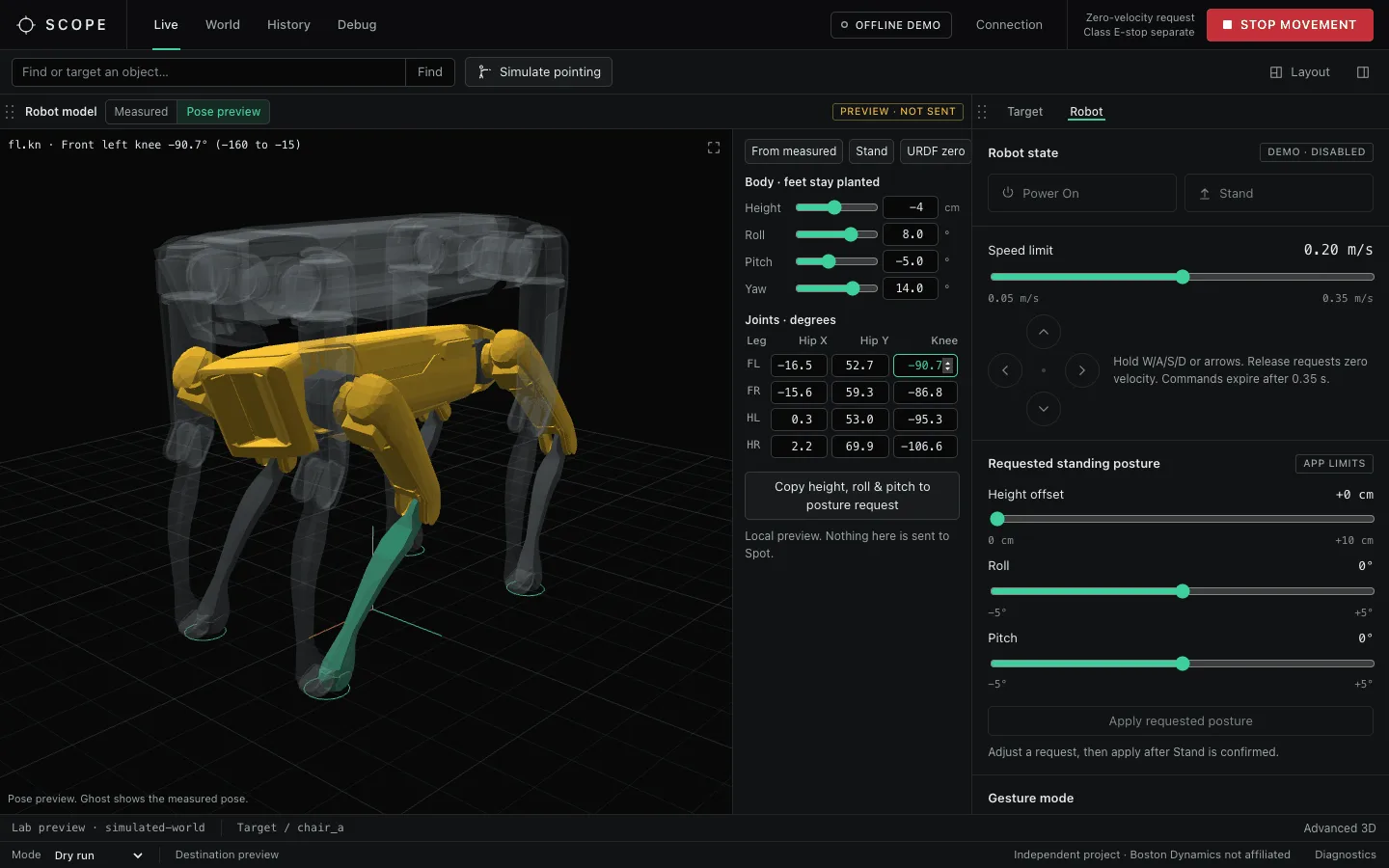
- Driving only unlocks after fresh telemetry confirms Spot is standing. Speed is capped at 0.35 m/s, and posture changes are limited to +10 cm of height and ±5° of roll and pitch.
- The server only listens on the local machine, credentials are never saved, and the SDK E-stop runs as its own process, independent of the console.
Robot model and pose preview
The model panel renders Spot from the SDK’s URDF. In Measured mode it follows the 12 leg joint angles from live telemetry, but only after checking that the robot’s reported skeleton matches the model. Pose preview runs entirely locally. You can drag a leg or the body and an approximate IK solver keeps the feet planted, then copy height, roll, and pitch into a posture request, clamped to the limits above.
Status
Manual control, the camera pipeline, mapping, target selection, and destination preview are built and tested. The full suite runs offline against a deterministic synthetic room with exact geometry. In Spot mode, GO currently runs as a dry run: it logs the command it would send and the robot doesn’t move.
A supervised GO executor (SE2 trajectory commands, 0.20 m/s and 0.30 rad/s limits, renewed 0.75 s expiry) has only been tested against a fake command client. It will move to physical testing after an eight-step checklist covering sensors, overlays, alignment, mapping, targeting, and Stop latency on the real robot.
Next: spoken commands, and control or viewing through VR headsets or smart glasses.