← Projects Research / Visual speech recognition
LIP-TRAC
Lipreading through a Temporal Recurrent and Convolutional network
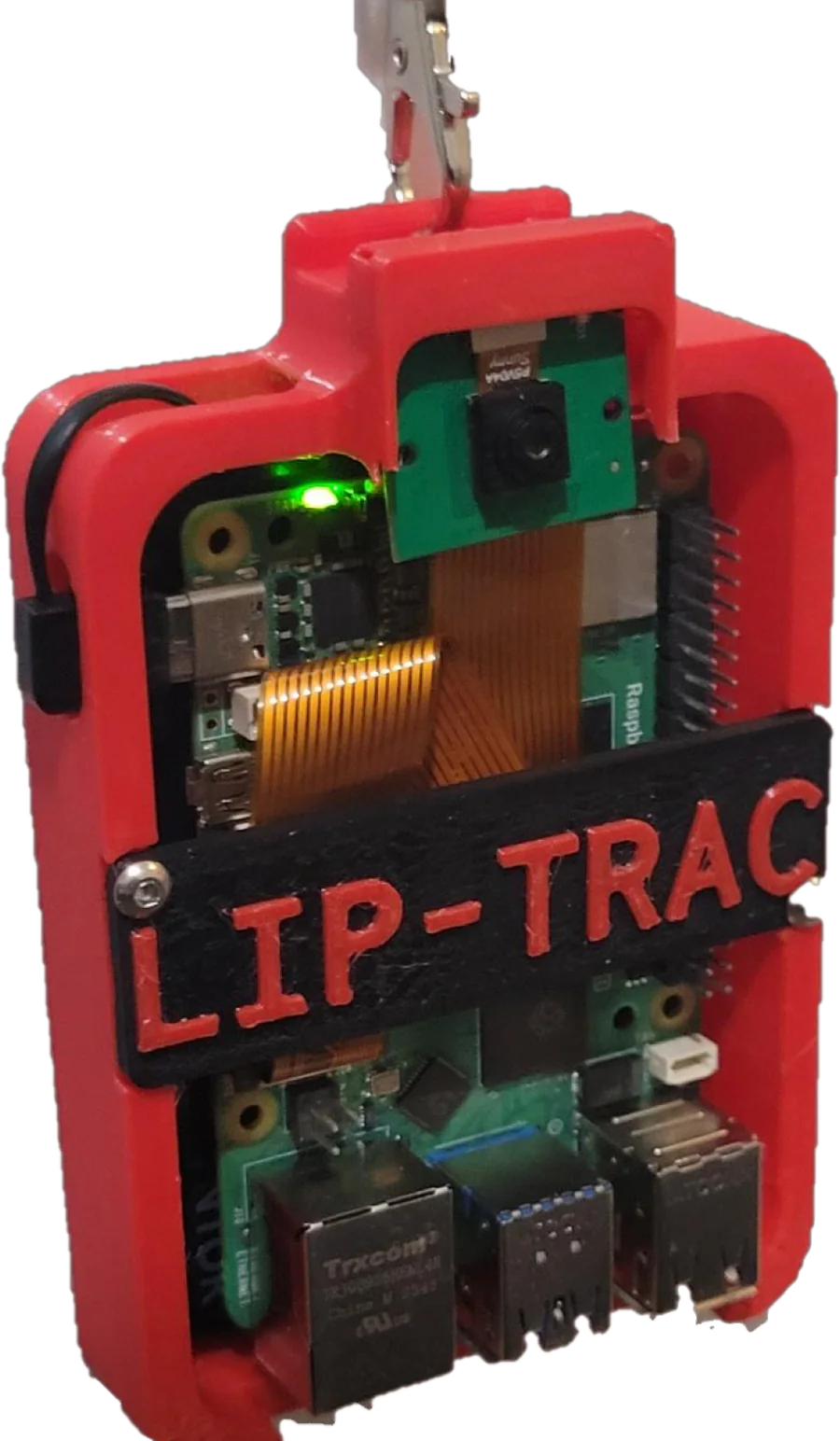
LIP-TRAC reads sentences from silent video of a speaker’s mouth. Three 3D convolutions and two bidirectional GRUs, trained with CTC loss on the BBC LRS2 dataset, transcribe each clip on a Raspberry Pi 5 inside a 3D-printed case.
- Word error rate
- 32.7%
- Character error rate
- 14.0%
- Inference
- 6.3s
- RTPS
- 0.1068
LRS2, 456 held-out clips
Same split
Mean per clip, Raspberry Pi 5
Highest of 7 models compared

Why read lips at all
Speech recognition that listens breaks down where people with hearing loss most need help: loud rooms, several voices at once, and conversations with no audible speech, whether that is a library or a speaker with aphonia. Video of the mouth carries none of that noise.
The hard parts are accuracy and cost. Unaided human lipreaders recognise roughly 30% of words. The most accurate lipreading models are large networks built for benchmark scores, and many of those papers don’t report how long inference takes. A hearing aid averages over $1,000 and does little for aphonia or aphasia.
So LIP-TRAC was given three targets before training began: work across speakers, reach under 35% word error and 20% character error, and return text within 10 seconds of the speaker finishing, on hardware a person can actually buy.
- 1 in 5
- people worldwide live with hearing loss WHO, 2024
- 700M+
- projected to have disabling hearing loss by 2050 WHO, 2024
- ~30%
- of words recognised by human lipreaders Assael et al., 2016
- $1,000+
- average price of a hearing aid paper, §I
From a camera frame to 4,800 bytes
Five steps turn every clip into network input, identically in training and on the device; a sixth prepares the transcripts for training. The goal is to hand the network only the part of the image that moves when someone speaks.
-
01
Capture
A 160 × 160 RGB stream, cut into clips shorter than 150 frames.
-
02
Find the face
OpenCV’s frontal-face Haar cascade runs on every frame. When a frame has no detection, the last good box is reused, so one missed frame doesn’t break the clip.
Haar-like features, boosted and chained into a cascade (Viola–Jones) -
03
Crop the mouth
The crop is relative to the face box: from 65% of its height down to the bottom edge, and from 5% to 95% of its width. Because it scales with the box, the same rule works whether the speaker is close to the camera or far from it.
-
04
Shrink
Resize to 40 × 120 and drop to grayscale. Lip shape is carried mostly by luminance, and a single 8-bit channel at this size is 4,800 bytes per frame, 16× less than the 76,800-byte source.
Both drawn at the same scale. -
05
Normalise per clip
Subtract the clip’s average frame, then divide by the standard deviation of every pixel in the clip. What reaches the network is how far each pixel strays from that clip’s average, which is the part that changes when someone talks. Static lighting and skin tone mostly drop out.
x̂t= xt − μσxt, one frameμ, clip averagedeviationFrame and clip average recovered from the poster (panel 3). The difference is computed in your browser, after putting both on a common scale and lightly smoothing. Brighter and darker than average. -
06
Encode the transcript
Labels use upper-case A–Z and space. Numerals are written out (“5” becomes “FIVE”), and every transcript is padded to 145 characters. CTC adds one more symbol, the blank.
- A
- B
- C
- D
- E
- F
- G
- H
- I
- J
- K
- L
- M
- N
- O
- P
- Q
- R
- S
- T
- U
- V
- W
- X
- Y
- Z
- ␣
- ·
26 letters, space, and the CTC blank (·)
Twelve layers
The network follows the spatiotemporal-CNN, recurrent, CTC design that LipNet introduced for sentence-level lipreading, kept small enough to run on a Raspberry Pi 5.
- 3 × 3 × 3 kernels span three neighbouring frames, so even the first layer sees motion, not only shape.
- Pooling is (1, 2, 2). Height and width halve at each stage; time never does, so every input frame keeps its own output step for CTC.
- GRU over LSTM. Two gates instead of three. GRUs were chosen after testing both, for faster inference.
- Bidirectional. Each clip is read forwards and backwards, so every frame sees context from both sides.
- Dropout 0.5 after each recurrent layer.
| Shape | # | Layer | What it does | Params |
|---|---|---|---|---|
| in | Input | T × 40 × 120 × 1 normalised mouth crops | 0 | |
| 1 | Conv3D 3×3×3, 32, ReLU | 32 feature maps per frame | 896 | |
| 2 | MaxPool3D 1×2×2 | H, W halved · T kept | 0 | |
| 3 | Conv3D 3×3×3, 64, ReLU | 64 feature maps | 55,360 | |
| 4 | MaxPool3D 1×2×2 | H, W halved · T kept | 0 | |
| 5 | Conv3D 3×3×3, 96, ReLU | 96 feature maps | 165,984 | |
| 6 | MaxPool3D 1×2×2 | H, W halved · T kept | 0 | |
| 7 | TimeDistributed Flatten | one feature vector per frame | 0 | |
| 8 | Bidirectional GRU | forward ⊕ backward over T | – | |
| 9 | Dropout 0.5 | regularisation | 0 | |
| 10 | Bidirectional GRU | forward ⊕ backward over T | – | |
| 11 | Dropout 0.5 | regularisation | 0 | |
| 12 | Dense softmax | character + blank distribution per frame | 14,877 |
Training without frame-level labels
LRS2 gives one transcript per clip, not a letter per frame. Connectionist Temporal Classification removes the need for that alignment. At every frame the network outputs a character or a blank, and the loss adds up the probability of every frame-by-frame path that collapses to the right transcript. Decoding is two rules: merge repeated symbols, then delete blanks.
- path
- · B B B K ·
- merge repeats
- · B K ·
- drop blanks
- BK
LIP-TRAC’s own output after 5 epochs of training (paper, Fig. 8). It has found the B and the K but not the vowels.
Why word error is higher than character error
A doubled letter survives decoding only if the network emits a blank between the two copies. LIP-TRAC’s most frequent mistake was missing that blank, so HELLO came out as HELO. That is one wrong character, and a whole wrong word, which is the main reason its WER (32.7%) sits so far above its CER (14%). In practice HELO is still readable.
L = −1N Σi log P(yi | Xi)
P(y | X) sums over every alignment that collapses to transcript y. Over training, the loss fell from about 210 to about 27.
Trained on one consumer GPU
- Framework
- TensorFlow, Keras
- Data
- BBC LRS2, 683 training and 456 test clips, shuffled before the split
- Hardware
- NVIDIA RTX 3060 Ti, 4,864 CUDA cores, 8 GB. First trials ran on an Intel Core i5-12600K CPU.
- Optimizer
- Adam
- Learning rate
- 3.0 × 10⁻⁶ initial, exponential decay
- Batch size
- 1. Clips vary in length and 3D convolutions are memory-hungry on 8 GB.
- Epochs
- Up to 300, with periodic checkpoints
- Iterations
- 14 model versions
- CTC loss
- ≈210 → ≈27
- Word accuracy
- ≈0% → 67.3%
- Character accuracy
- rising from the start → 86.0%
Word accuracy stayed near zero for roughly the first 75 epochs while character accuracy was already climbing. A word only counts once every letter in it is right.
Epoch 92/300
1/1 [==============================] - 0s 93ms/step
Original:   WHATEVER YOUR REQUIREMENTS
Prediction: WHATEVER YOUR REQUIREMENTS
Word Error Rate: 0.0%Results
| Criterion | Target | Measured | Status |
|---|---|---|---|
| Word accuracy | WER < 35% | 32.7% WER on 456 held-out LRS2 clips | met |
| Character accuracy | CER < 20% | 14.0% CER | met |
| Latency | < 10 s after speech ends | 6.3 s mean per clip on a Raspberry Pi 5 | met |
| Speakers | Not tied to one speaker | 65.8% word accuracy on new speakers and sentences | met |
Real-Time Performance Score
Accuracy-only leaderboards hide latency. RTPS, introduced in the paper, divides word accuracy by inference time:
RTPS = 1 − WERt = 0.6736.3 s = 0.1068
On the chart it is the slope of a line from the origin. Anything steeper is better. Move across the chart to read off the score for any accuracy and latency.
In the paper’s comparison with six published LRS2 lipreading models (2017–2023), LIP-TRAC had the highest RTPS.
Word accuracy, alongside published models
Field trials on the device
New sentences, spoken by people outside the training set, run on the Pi 5 in its printed enclosure. The averages landed within about 5% of the test-set results.
| Phrase | Word acc. | Char. acc. | Inference |
|---|---|---|---|
| 1 | 61.2% | 89.1% | 7.1 s |
| 2 | 83.5% | 94.0% | 6.6 s |
| 3 | 59.7% | 67.8% | 6.4 s |
| 4 | 67.8% | 92.3% | 6.3 s |
| 5 | 56.6% | 74.5% | 5.8 s |
| Mean | 65.8% | 83.5% | 6.4 s |
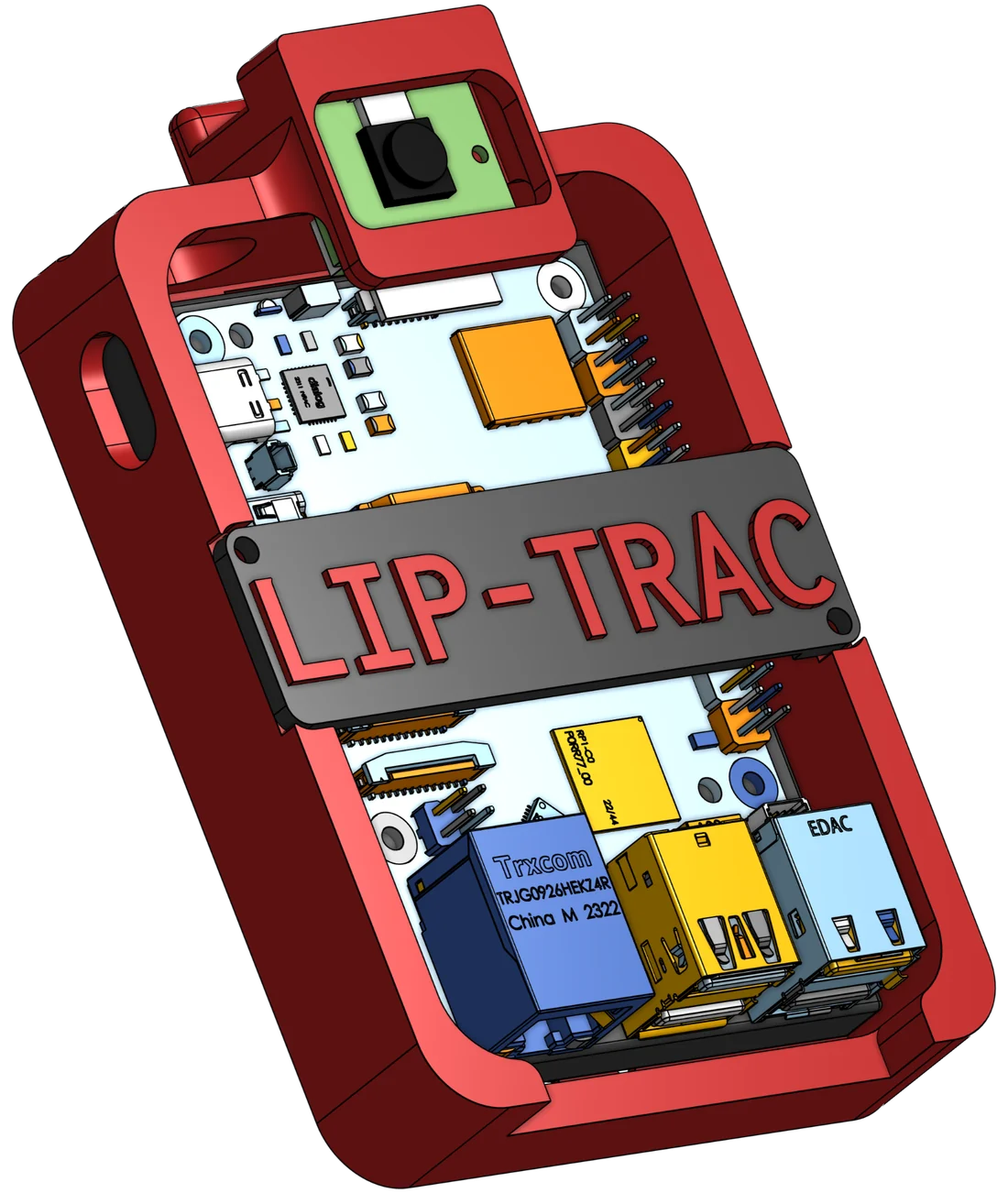
- Camera module
- Raspberry Pi 5
- 3D-printed enclosure
The device
The enclosure was modelled in CAD around a Raspberry Pi 5 and its camera module, then 3D-printed. The assembled unit, pictured at the top of this page, is the hardware the field trials ran on. Face detection, cropping, normalisation and inference all happen on the Pi, from video alone.
- Compute
- Raspberry Pi 5
- Input
- Camera, 160 × 160 RGB
- Latency
- 6.3 s mean per clip
- Enclosure
- 3D-printed, CAD-modelled
Limits, and what comes next
What it can’t do yet
- It has only seen British English broadcast speech (LRS2). Other languages, accents, very low light and extreme head poses may not hold up.
- It is visual-only, so it can’t use clean audio even when some is available.
- CTC decoding drops doubled letters when the blank between them is missed.
- 6.3 seconds clears the paper’s real-time bar but is still slower than conversation.
- The Pi’s compute budget is fixed, so accuracy gains have to come without giving up efficiency.
Next
- Add a microphone and use audio to validate the visual transcript.
- Predict words from a dictionary instead of single characters.
- Add an n-gram language model for sentence context.
- Use attention and the whole face, not just the mouth.
- Other languages, a multilingual model, or the IPA, once suitable data exists.
Documents and references
- Chung, Senior, Vinyals & Zisserman. Lip reading sentences in the wild. CVPR 2017. doi:10.1109/CVPR.2017.367
- Graves, Fernández, Gomez & Schmidhuber. Connectionist Temporal Classification. ICML 2006. cs.toronto.edu
- Assael, Shillingford, Whiteson & de Freitas. LipNet: End-to-End Sentence-level Lipreading. 2016. arXiv:1611.01599
- Lip Reading Sentences 2 (LRS2) dataset. Visual Geometry Group, University of Oxford. robots.ox.ac.uk
- World Health Organization. Deafness and hearing loss. 2024. who.int